
Assalam o Alaikum friends, Farooq here! Did your GEPCO bill get lost this month? Maybe the meter reader never came, or the bill got wet and torn. Don’t worry, it happens to many of us. You do not need to run to the office. To get free energy then install solar panels at home.
Getting a duplicate bill online is very easy. You only need your reference number and a phone or laptop. It takes about 2 minutes. It is also free, so you save both time and money.
In this guide, I will show you the simple steps. I will also tell you where to find your reference number on an old bill. Once you know this, you can check your bill and pay on time without any stress. A late bill can mean a late payment surcharge, and nobody likes that. K-Electric Duplicate Bill Online: Download in 2 Minutes 2026
Pro Tip: Save your reference number in your phone notes right now. Next month, you can download your bill in seconds. Also check your bill a few days before the due date, so you never pay extra.
How to Check, Download and Print Your GEPCO Bill
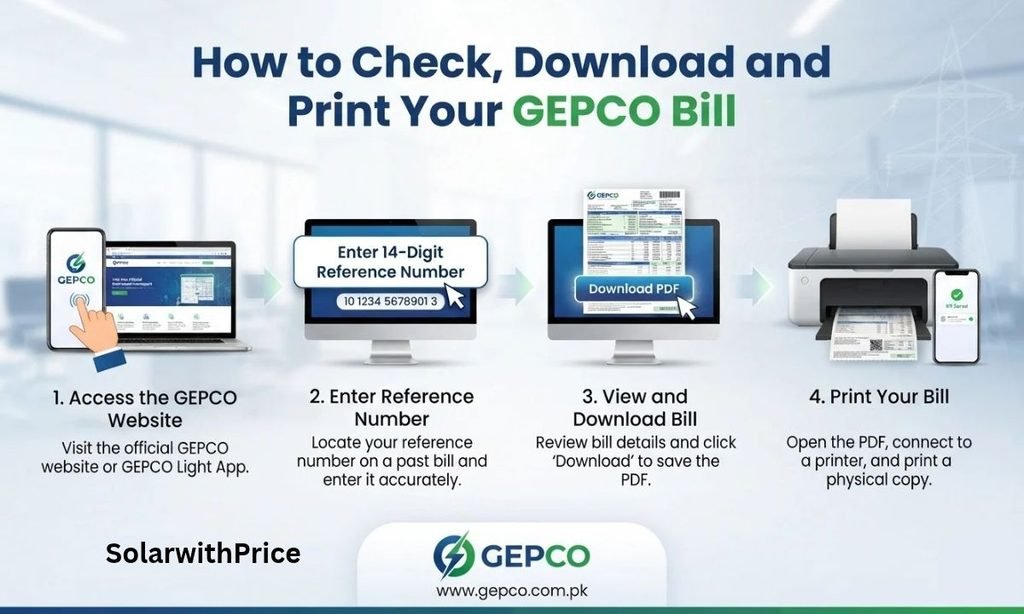
Checking your GEPCO bill is very easy. You only need your reference number and a phone or laptop. Let me show you each step.
What You Need First
- Your 14-digit reference number
- A phone or laptop with internet
- A printer, if you want a paper copy
How to Check Your GEPCO Bill Online
- Open the official GEPCO website on your phone or laptop.
- Find the “Bill” or “Duplicate Bill” option.
- Type your 14-digit reference number.
- Press the “Search” or “Submit” button.
- Your bill shows on the screen.
Check Your Bill on the Mobile App
- Install the official GEPCO app from your phone store.
- Open the app and enter your reference number.
- Your bill amount and due date will show right away.
- Save your number in the app so you can check faster next time.
How to Download Your GEPCO Bill
- After your bill opens, look for the “Download” or “Save as PDF” button.
- Tap it and the file saves in your phone or laptop.
- Open your Downloads folder to find the PDF.
- You can also take a clear screenshot if there is no download button.
How to Print Your GEPCO Bill
- Open the bill on your laptop or phone.
- Press the “Print” button or use Ctrl + P on a laptop.
- Choose your printer and select A4 paper.
- Check that the reference number, amount, and due date are clear.
- Click “Print” and keep the paper copy safe.
Where to Find Your Reference Number
- Look at the top of any old GEPCO bill.
- Check the paper receipt from a past payment.
- Ask a family member who pays the bill.
Pro Tip: Always print your bill in black and white on A4 paper. It is cheaper, and the bank or shop can still read it easily.
What Is a GEPCO Duplicate Bill?
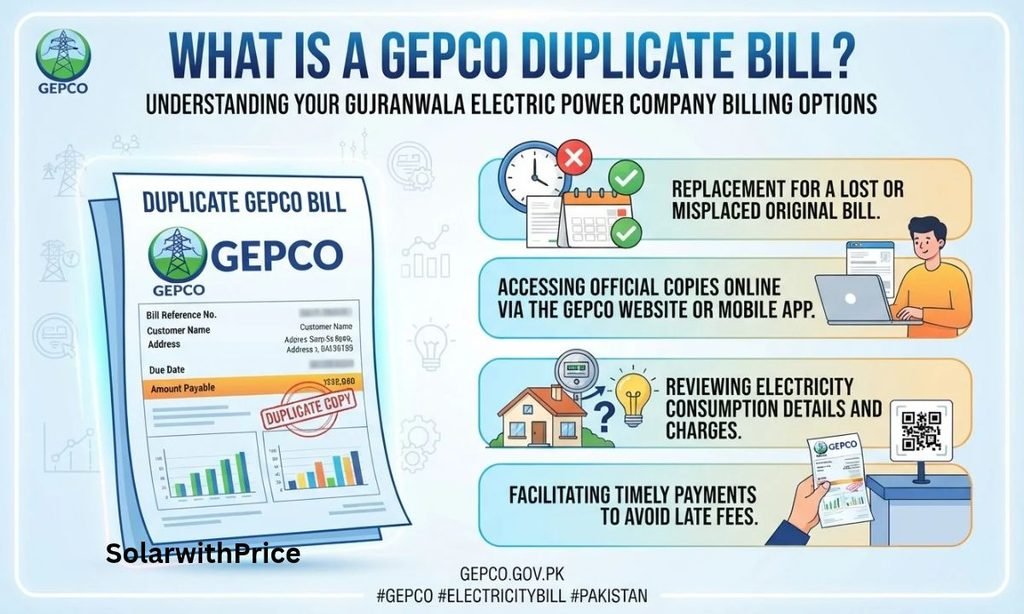
A GEPCO duplicate bill is an online copy of your monthly electricity bill from the Gujranwala Electric Power Company. It shows the same details as the paper bill that comes to your home. You can view it, download it, and print it any time.
People use it when the paper bill is late, lost, torn, or wet. It is also handy when you want to pay through a banking app, since you can match the amount and due date before you pay.
Quick answer: To check your GEPCO bill online, open the official bill page, type your 14-digit reference number (or 10-digit customer ID), and press the search button. Your bill opens on the screen.
A duplicate bill is not a new or different bill. The amount, units, and due date are the same as the original. Nothing extra is added.
What You Need Before You Check Your GEPCO Bill
You need very little. Keep these things ready:
- A phone, tablet, or computer with internet
- Your reference number or customer ID from any old bill
- A PDF viewer or a printer, if you want a paper copy
That is all. You do not need to make an account. You do not need to pay anything to see your bill.
Pro tip: Take a clear photo of your bill today and keep it in a phone folder named “Electricity”. Next month, you will not need to hunt for the number.
Which Number Works?
Not every number printed on your bill works for online search. This table clears the confusion.
| Number on Your Bill | Works for Online Bill Check? | Notes |
| 14-digit reference number | Yes | The most common and most reliable option |
| 10-digit customer ID | Usually yes | Select the correct option on the page |
| Meter number | No | Identifies the meter, not the account |
| CNIC number | No | Not accepted for normal bill lookup |
| Mobile number | No | Not a bill search key |
| Name or address | No | Not used for public bill search |
If you type a meter number in the reference box, the page will say the bill is not found. This is the number one mistake people make.
How to Check GEPCO Bill Online (Step by Step)
Follow these simple steps. They take about one minute.
- Open your phone browser, such as Chrome.
- Go to the official GEPCO or PITC bill inquiry page.
- Find the box for reference number or customer ID.
- Type the number using digits only. Do not add spaces or dashes.
- Press the Search or Submit button.
- Your GEPCO bill will open on the screen.
- Check the amount, due date, and billing month.
That is the whole process. If the page does not load at once, wait a few seconds and try again.
Real-life tip: Many people copy the number from a text message or a note and paste it. Sometimes a hidden space comes along with it. If the bill does not open, delete the number and type it by hand.
What You Will See on the Screen
Once the bill opens, you will see these main details:
- Consumer name and address
- Billing month
- Meter reading (old and new)
- Units used
- Total payable amount
- Due date
- Amount payable after the due date
Read the due date first. It tells you how much time you have to pay without a penalty.
How to Download GEPCO Duplicate Bill
Many people search for GEPCO duplicate bill download because they want a file they can keep or send to family. There are three easy ways.
Method 1: Save as PDF
This is the cleanest method, and it works on most phones and computers.
- Open your bill on the screen.
- Tap the Print option or the browser menu (three dots).
- Choose Save as PDF instead of a printer.
- Pick a folder and press Save.
Your bill is now saved as a PDF file. Name it with the month, for example “GEPCO Nov 2026”. Later, you can find it in seconds.
Method 2: Take a Screenshot
This is the fastest way. Press the power and volume-down buttons together on most Android phones. Then crop the picture so only the bill shows.
A screenshot is fine for payment and for sharing with a family member. For official work, a PDF looks better.
Method 3: Save a Photo of the Printed Page
If you printed the bill, take a photo of the page. It works as a backup if your phone storage is full.
Pro tip: Save every bill in one folder by year. When a landlord, tenant, or office asks for proof of address, you can find it quickly.
How to Print Your GEPCO Duplicate Bill
Printing is simple. Open the bill, press Print, choose your printer, and select A4 paper size. Check the preview first. Make sure the bottom part with the payment details is not cut off.
If you have no printer at home, go to a nearby shop with printing service. Send them the PDF by WhatsApp. Do not give them your CNIC or any private papers. The bill alone is enough.
Good to know: A printed duplicate bill is accepted by banks and payment counters for paying the amount. Most people simply pay through an app and never print at all.
GEPCO Duplicate Bill Online Check Near Gujranwala
Many readers type “gepco duplicate bill online check near Gujranwala” into Google. The good news is that online bill checking works the same in every city. You do not need to be close to the office.
GEPCO serves Gujranwala and several nearby districts. These include Sialkot, Gujrat, Hafizabad, Mandi Bahauddin, and Narowal. Customers in all these areas use the same online bill system.
If You Have No Internet
Sometimes mobile data is weak, especially in villages. You still have options:
- Ask a family member or neighbor to open the bill on their phone.
- Visit a mobile shop or a small internet cafe in your area.
- Go to your local GEPCO sub-division office and ask for a copy.
- Visit a bank branch or a payment shop where staff can search by reference number.
Real-life tip: In many neighborhoods, the shop that sells mobile load also helps people with bill payments. They only need your reference number, so keep it written on a small card in your wallet.
Finding Your Sub-Division
Your sub-division name is printed on your bill. Write it down. If your meter reading looks wrong, or the bill does not come, you will know exactly which office to call or visit.
Check GEPCO Bill by SMS
Some consumers prefer text messages, especially if their phone is not a smartphone. In many cases, you can send your 14-digit reference number by SMS to the official bill service number and get a reply with bill details.
Charges and service numbers can change, so check the latest details on your bill or on the official GEPCO website before you send a message.
| Method | Needs Internet? | Best For |
| Online bill page | Yes | Viewing, downloading, printing |
| SMS service | No | Quick amount check on a basic phone |
| Sub-division office | No | Copy of bill, complaints |
| Banking or wallet app | Yes | Checking and paying in one step |
GEPCO Duplicate Bill Previous Month
People often search for GEPCO duplicate bill previous month when they need an old bill. Maybe they lost last month’s bill, or they want to check if they paid on time.
The online bill page shows the current bill, and many pages also show a bill history or earlier months. If you cannot see an old month, try these steps.
- Open your current bill first.
- Look for the section called “Arrears” or “Previous Balance”. If money is due from last month, it shows here.
- Check your bank app or wallet history. Every payment has a date and an amount.
- If you still need an old bill, ask your sub-division office for a copy.
How to Check If You Paid a Bill
Open your latest bill and check the arrears line. If it shows zero, your last bill was paid. Next, compare the amount with your payment receipt.
Important: Allow a few days after payment. Sometimes the bill system takes time to update. If your bank app says “successful”, do not pay again. Keep the receipt safe until your next bill shows the payment.
Pro tip: Screenshot the payment receipt right after paying. A few people have faced wrong “unpaid” notes, and a receipt solves the problem fast.
What Is a Reference Number and Customer ID on an Electricity Bill in Pakistan?
This is one of the most asked questions, so let us make it very simple.
Reference Number
The reference number is the main ID of your electricity connection. Think of it like a house number for your meter account. It stays the same month after month.
In most bills, you see 14 digits. On older bills, the number may include a letter like U (urban) or R (rural) at the end. When you search online, type the digits only.
The number is usually printed near the top of the bill, in the main details box. Look for the words “Ref No” or “Reference No”.
Customer ID
The customer ID is another number that identifies you as a consumer. It is usually 10 digits. It is printed on the bill, often near the reference number or on the payment slip.
Some bill pages accept both numbers. Others work best with the reference number. When in doubt, use the reference number.
Reference Number vs Customer ID
| Feature | Reference Number | Customer ID |
| Length | 14 digits | 10 digits |
| Changes every month? | No | No |
| Used for online bill check | Yes, mostly | Sometimes |
| Used for bank payment | Yes | Rarely |
| Where to find it | Top of the bill | Near details box or slip |
Where to Find the Reference Number If You Lost the Bill
Do not worry if you cannot find an old bill. Try these places:
- An old payment receipt from a bank or wallet app
- A message from a family member who paid before
- Your landlord, if you rent
- The meter itself. Some meters have a label with details
- Your sub-division office. Take your CNIC and the meter number with you
Real-life tip: Tenants should ask the landlord for the reference number on the first day. It saves a lot of trouble when the bill is late.
How to Read Your GEPCO Bill Without Confusion
Many people look only at the big amount. But a few minutes of reading can save money. Here is what the main parts mean.
| Bill Part | What It Means in Simple Words |
| Billing month | The month the bill is for |
| Previous reading | The meter number last month |
| Present reading | The meter number this month |
| Units consumed | Present reading minus previous reading |
| Energy charges | Price of the units you used |
| Fixed charges | A set amount on some connections |
| Fuel price adjustment | An extra charge or credit linked to fuel costs |
| Taxes | Government taxes added to the bill |
| Arrears | Old unpaid money |
| Due date | Last day to pay without a penalty |
| Late payment surcharge | Extra money if you pay after the due date |
How Units Are Counted
Your meter counts electricity in units. One unit means one kilowatt-hour (kWh). A 1,000-watt heater running for one hour uses one unit.
If last month’s reading was 5,000 and this month’s is 5,300, you used 300 units. Check this math on your bill. It should match.
Why Slabs Matter
Household bills are often calculated in slabs. The more units you use, the higher the rate can become. A few extra units can push you into a higher slab and raise the bill a lot.
Pro tip: If you are near a slab limit, avoid heavy use like irons and water motors for the last few days of the month. This one habit can reduce your bill.
Understanding Due Date and Late Payment
Every bill has two amounts. One is for payment on or before the due date. The other is for payment after the due date, and it is higher because of the late payment surcharge.
Here is how to avoid it:
- Check the bill as soon as the month ends
- Set a phone reminder two days before the due date
- Pay early, not on the last day, because banks and apps can be slow
- Save the receipt
Bank holidays and weekends can also delay payment. Do not wait until the last hour.
Ways to Pay Your GEPCO Bill
After checking the duplicate bill, you can pay it in many ways.
| Payment Method | How It Works | Good Point |
| Mobile banking app | Select bill payment, choose electricity, enter reference number | Fast and from home |
| Mobile wallet | Same steps inside the wallet app | Easy for small payments |
| ATM | Use the bill payment option | Works outside bank hours |
| Bank branch | Take a printed bill to the counter | Good if you prefer cash |
| Franchise or retail shop | Give the reference number and amount | Handy in small towns |
Always check before you confirm: the biller name, the reference number, the billing month, and the amount. One wrong digit can send your money to someone else’s account, and fixing it takes time.
Common Problems and Easy Fixes
Sometimes the bill does not open. These are the usual reasons and the simple answers.
| Problem | Likely Reason | What to Do |
| “Bill not found” | Wrong number or extra space | Retype the 14 digits by hand |
| Page does not load | Heavy traffic or slow internet | Wait, then try again or use another browser |
| Old bill showing | New bill not yet uploaded | Check again after one or two days |
| Number not accepted | Wrong option selected | Choose reference number or customer ID correctly |
| New connection, no bill | Billing has not started | Wait for the first bill, or ask the sub-division |
| Bill amount looks too high | Wrong reading, or heavy use | Check the meter and compare readings |
Step-by-Step Fix When the Bill Will Not Open
- Check that you used the reference number, not the meter number.
- Remove all spaces and letters.
- Count the digits. There should be 14.
- Try another browser or another phone.
- Try again later in the day. Early morning often works faster.
- If nothing works, contact your sub-division office.
If You Have a New Connection
New customers often panic because they cannot find a bill. A new connection needs a little time before the first regular bill starts. Until then, use the number from your connection papers. After the first bill is issued, use the reference number printed on it.
What to Do If Your Bill Is Too High
A high bill is stressful, but do not panic. Follow these steps in order.
- Compare units. Look at the units used this month and last month.
- Read your meter yourself. Take a photo of the meter display and match it with the bill’s present reading.
- Check the bill type. Make sure the billing month is correct.
- Look at arrears. Sometimes old unpaid money is added.
- Visit your sub-division office. Take the bill, the meter photo, and your CNIC.
- Ask for a written complaint number. Keep it safe.
If the bill is disputed, ask the office what amount you should pay before the due date. This avoids extra penalties while the problem is being checked.
Real-life tip: Take a meter photo on the first day of every month. It is a free habit that gives you strong proof if the reading is ever wrong.
Safety Tips: Avoid Fake Bill Websites and Scams
Because so many people search for bills online, scammers also try to take advantage. Stay careful.
- Use only the official GEPCO or PITC bill page.
- A real bill check asks only for the reference number or customer ID.
- Never share your OTP, PIN, card number, or password with anyone.
- Do not trust a caller who says your power will be cut unless you send money to a personal number.
- Pay only through your own banking app, wallet, bank branch, or a trusted payment counter.
If a page asks you to log in with your bank details just to see a bill, close it right away.
Duplicate Bill vs Original Bill
People often wonder if the online copy is acceptable. This table helps.
| Point | Original Paper Bill | Duplicate Bill |
| Amount | Same | Same |
| Due date | Same | Same |
| Delivery | By hand or post | Online, any time |
| Can be lost | Yes | You can always open it again |
| Good for payment | Yes | Yes |
| Cost | Free | Free to view |
For paying the bill, a duplicate is perfectly fine. For official use like a utility proof in some offices, a clear printed copy usually works well too. But rules can differ, so ask the office that needs it.
Smart Habits to Never Miss a GEPCO Bill
A little planning makes bill time easy. Here are habits that real households use.
- Save your reference number in your phone contacts under “GEPCO Ref”.
- Set a monthly reminder around the same day each month.
- Check the bill online soon after the meter reading date.
- Pay a few days early.
- Keep digital receipts in one folder.
- Share the number with a trusted family member, so they can pay if you are away.
- Update your details with the office if you move house or change ownership.
For Landlords and Tenants
If you rent a home or shop, agree on who pays the bill and when. The bill is tied to the meter and the address, so unpaid dues can stay with the property. Before you move in, check the latest bill and the arrears line. When you move out, pay the final bill and take a photo of the meter.
Simple Ways to Lower Your Electricity Bill
Checking your bill is the first step. Lowering it is the next. These habits work in most Pakistani homes.
- Switch to LED bulbs. They use far less power than old bulbs.
- Use inverter air conditioners if you can afford them.
- Set the AC at a moderate temperature, not the lowest setting.
- Switch off fans and lights when you leave a room.
- Clean fan blades and AC filters often.
- Run the iron in one batch, not every day.
- Use the water motor only when needed.
- Unplug chargers and devices that stay on standby.
Track your units each month. When you see the number drop, you will know your new habits are working.
Related Guides and Articles
If you liked this guide, these topics will help you too:
- How to find your electricity reference number on an old bill: useful if you changed your house or phone
- How to check other electricity company bills: the same reference number method works for LESCO, IESCO, FESCO, MEPCO and other companies
- How to apply for a new electricity connection: the documents and steps you need
- How to change the name on an electricity meter: a common need after buying or renting a property
- How to read your electricity meter: a basic skill that protects you from wrong readings
- How solar net metering affects your bill: helpful if you plan to install solar panels
Each of these topics builds on the basics you learned here.
Checking a GEPCO duplicate bill online is easy once you know the right number. Keep your 14-digit reference number safe, type it carefully, and your bill appears in seconds. You can then view it, download it, print it, and pay it without leaving home.
Good habits matter more than fancy tools. Save your number, take a meter photo each month, pay before the due date, and keep your receipts. These small steps protect you from late fees and wrong bills.
Final Words
Assalam o Alaikum friends, Farooq here! Losing your GEPCO bill is a small problem, but it can feel big when the due date is close. The good news is that you can fix it in two minutes. All you need is your reference number and a phone. No office visit, no long line, and no fee.
Let me share a quick summary of what we learned. You can download a duplicate bill online from the official GEPCO website or the mobile app. Just type your 14-digit reference number and press the button. Your bill shows up on the screen. You can save it as a PDF or print it for payment.
My last advice is simple. Do not wait for the last day to pay your bill. A late payment can add a surcharge, and that money is better in your pocket. Pay early, keep your receipt safe, and write your reference number somewhere you can find it. If this guide helped you, share it with a friend who also gets lost with paper bills. Take care, and see you in the next post!
Pro Tip: Set a phone reminder for 5 days before the due date every month. That way, you will never miss a payment.
FAQs
How to check your electric bill online?
Open your power company’s website or app and type your 14-digit reference number. Press the button and your bill shows on screen. You can save it as a PDF or print it.
How can I check my Sui gas bill online in 2026?
Go to the SNGPL or SSGC website, depending on your city. Enter your consumer number and tap Check. Your bill, due date, and amount will show right away.
How to check Wapda electricity bill online?
Wapda bills now come from companies like GEPCO, LESCO, and MEPCO. Visit your company’s bill page and enter your reference number. You will see your latest bill in seconds.
How to check for an electricity bill?
You can check it online, through your company’s mobile app, or by SMS. You can also ask at a nearby shop that accepts bill payments. Online is the fastest way.
How to check your light bill online?
A light bill is just another name for your electricity bill. Use your reference number on your company’s website or app. It takes about two minutes.
How to download a UP electricity bill PDF?
For Uttar Pradesh, visit the official UPPCL website or the UPPCL app. Enter your account number and open your bill. Then tap the download or print button to save the PDF.
How is 1 unit of electricity calculated?
One unit means one kilowatt-hour (1 kWh). It is the power of 1,000 watts used for one hour. In Pakistan, home rates change by slab, so more units mean a higher rate per unit.
Which app is best for bill payment?
Use your own power company’s app to check bills. For payment, bank apps, JazzCash, and Easypaisa are the most popular in Pakistan. Pick the one you already use, and keep your receipt safe.
Pro Tip: Always check the app or site for the latest rate before you write about it, as NEPRA changes the fuel adjustment almost every month.

I AM CH SAMI ULLAH, THE TOP SOLAR PANEL SELLER AND INSTALLER IN PAKISTAN, WITH CHEAPEST RATES, OF TOP QUALITY. GET THE LATEST RATES ON SOLAR PANELS, FANS, ACs, TUBE WELLS, SOLAR FRIDGES, AND SOLAR ATTA CHAKKIS. WHATSAPP (03461320821)
1 thought on “GEPCO Duplicate Bill Online: Download in 2 Minutes 2026”