

Assalam o Alaikum, friends, Sami Ullah here! Do you still wait in a long line to get your electricity bill? I know how tiring that is. Many families in South Punjab face this problem every month. The good news is that you can now do it from your phone.
In this guide, I will show you how to check your MEPCO bill online in 2026. MEPCO means Multan Electric Power Company. It supplies power to many cities like Multan, Bahawalpur, Sahiwal, and Dera Ghazi Khan. You only need your 14-digit reference number or your customer ID. The whole process takes less than two minutes.
Checking your bill on time saves you from late payment charges. It also helps you spot wrong units or extra fees. As a solar installer, I see many people get shocked by high bills. When you check early, you can plan your budget better. Let me walk you through each step in simple words. How to Check Your LESCO Bill Online in Seconds (2026)
Pro Tip: Save your reference number in a note on your phone. Check your bill every month in the first week, before the due date. This way, you never pay a late fee.
Check and Download Your MEPCO Bill
You can check your MEPCO bill online for free, any time of the day. All you need is your 14-character reference number. Type it in, press the check button, and your full bill appears on the screen. From there, you can download it as a PDF or print it.
You do not need to wait for the paper bill. Meter readers sometimes skip houses. Bills also get lost, wet, or delivered late. The online copy is the same as the paper one, so you can use it to pay at any bank or mobile wallet.
Quick answer:
| Question | Answer |
| What do I need? | Your 14-character reference number |
| Is it free? | Yes |
| Can I download it? | Yes, as a PDF or a printout |
| Can I pay with the online copy? | Yes, at banks, apps, and wallets |
| Who runs the service? | MEPCO, with a central billing system |
Where to Find Your Reference Number
Your reference number is printed on every MEPCO bill. Look at the top right side of the bill. It usually sits in a box near the words “Reference No.”
Not sure where to look? Try these places:
- An old paper bill is the easiest source.
- An SMS from MEPCO or your bank app, if you ever paid online.
- Your payment receipt from a bank or wallet.
- Your neighbor’s bill, only to see the format. Do not use their number for yours.
- The meter itself. Some meters have a sticker or tag with the connection details.
- Your MEPCO sub-division office. Take your CNIC and ask the clerk.
Pro tip: Take a clear photo of your bill the day it arrives. Save it in a folder called “Electricity.” I have seen many people run around for an hour, just for a number that was already in their phone.
What the 14 Digits Mean
The reference number is not random. Each part tells you something about your connection. On most bills the number is split into parts like this:
| Part | Length | What it tells you |
| Batch number | 2 digits | The billing group your meter belongs to |
| Sub-division code | 5 digits | The MEPCO office that looks after your area |
| Consumer serial number | 6 digits | Your own number inside that office |
| Last letter | 1 character | U means urban. R means rural |
Add them up and you get 14 characters. The last letter is easy to forget, but it matters. If you leave out the U or the R, the system may show “no record found.”
Pro tip: Type the number without extra spaces. Pick the right letter from the drop-down, or type it in capital letters. A small mistake in one digit will show someone else’s bill, or nothing at all.
What Is MEPCO?
MEPCO stands for Multan Electric Power Company. It is one of the government power distribution companies in Pakistan. MEPCO takes electricity from the national grid and delivers it to homes, shops, farms, and factories in its region.
It covers a large part of South and Central Punjab. This includes cities and districts such as Multan, Bahawalpur, Dera Ghazi Khan, Sahiwal, Okara, Vehari, Khanewal, Lodhran, Muzaffargarh, Layyah, Rahim Yar Khan, and Bahawalnagar. Millions of customers pay their bills to MEPCO every month.
MEPCO does not make the electricity. It buys it, carries it through lines and transformers, reads the meter, and sends the bill. The price rules come from the power regulator and the government, not from your local office.
How to Read Your MEPCO Bill
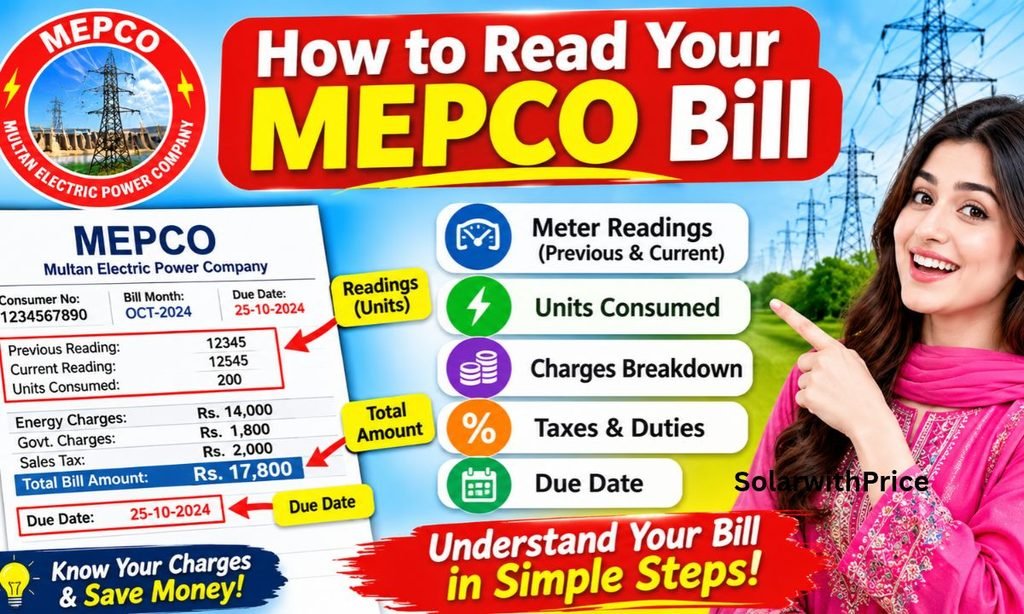
A MEPCO bill looks crowded at first. Once you know what each box means, it becomes simple. Let us go through the main parts one by one.
Previous and current reading
The meter counts your units of electricity. One unit equals one kilowatt-hour (kWh). That is what a 1000-watt heater uses in one hour.
- Previous reading is the number on the meter last month.
- Current reading is the number on the meter this month.
- Units consumed equals current reading minus previous reading, multiplied by the MF.
If your bill says the current reading is “estimated,” or the status is “locked” or “defective,” the reader did not take a real reading. This often causes an unfair, high bill.
Pro tip: On the first day of each month, take a photo of your meter. If the bill shows a wrong reading, your photo is strong proof.
Tariff
The tariff is your customer category. It decides how much you pay per unit. Common categories are:
| Tariff code | Meaning |
| A-1 | Residential (homes) |
| A-2 | Commercial (shops, offices) |
| A-3 | Industrial |
| A-4 | Agricultural (tube wells) |
Check this on your bill. A home that has a commercial tariff pays more for every unit. If you live in a house but the bill says commercial, ask your subdivision office to fix it.
Protected or unprotected
This is one of the most important boxes on a home bill.
- Protected customers use a low number of units, usually up to 200 units a month. They get lower rates.
- Unprotected customers use more than that. They pay higher rates.
A common rule is that you lose protected status if you cross 200 units for six months in a row. Some people cross the limit by only a few units and pay a lot more. Keep an eye on your units, especially in summer when the air conditioner and fans run all day.
Sanctioned load and MF
Sanctioned load is the amount of power, in kilowatts, that MEPCO has approved for your connection. A small house may have 1 to 5 kW. A large shop or factory needs more.
MF means multiplying factor. For most homes, MF is 1, so the units on your meter are the units you pay for. Some bigger meters use a number like 10 or 20. Then the meter reading is multiplied by that number.
Pro tip: If your MF looks wrong, say 10 for a normal home meter, call your subdivision office right away. A wrong MF can make your bill ten times bigger.
Taxes and adjustments
Your bill is more than units times the rate. Several lines are added on top of the basic charge:
- Fuel price adjustment (FPA): Fuel costs change each month. This line fixes the gap between the old and new cost.
- Quarterly tariff adjustment (QTA): A fixed charge that is applied every three months.
- Fixed charges: A fee for keeping the connection active.
- GST: General sales tax, charged on the bill.
- Income tax / further tax: Applies mostly to commercial customers and some high-use homes.
- Arrears: Money you did not pay before.
- Late payment surcharge: A penalty if you pay after the due date.
Some old charges, such as certain duties and TV fees, have been removed or changed in recent years. Always trust your own bill for the exact lines in your month.
12-month history
At the bottom or side of the bill you will see a small table or bar chart. It lists your units and bill amount for the last 12 months. This is a gold mine.
Use it to:
- Spot a sudden jump that does not match your life.
- Compare summer and winter use.
- See if you are near the 200-unit line.
- Prove your normal use if you need to file a complaint.
WAPDA MEPCO Bill Check Online
Many people still say “WAPDA bill” because WAPDA was the old name of the electricity department. Today, the work is done by separate companies like MEPCO. So when you search for WAPDA MEPCO bill check online, you are looking for the same thing: your MEPCO bill on the internet.
The steps are the same. Use your 14-character reference number, and you will see the same bill that the meter reader brings.
PITC MEPCO Bill Check Online
PITC stands for Power Information Technology Company. It runs the computer system that many power companies use to print and show bills. That is why you may see “PITC” at the top of the online bill page.
So, when you search for PITC MEPCO bill check online, you reach the same system. The bill is still a MEPCO bill. PITC just helps put it on your screen.
| Search term | What it really means |
| WAPDA bill check | Old name, same MEPCO bill |
| PITC bill check | The IT system that shows the bill |
| MEPCO bill check | The company that sends your bill |
How to Check Your MEPCO Bill in 3 Steps
It takes less than one minute. Here is the easy way.
Step 1: Find Your Reference Number
Pick up an old bill or open your saved photo. Find the 14-character number near the top. Read it twice. Make sure the last letter, U or R, is correct.
Step 2: Click “Check Bill”
Open the official MEPCO or PITC bill page on your phone or computer. Enter the number in the box. Press the “Check Bill” or “Search” button. Your bill will load.
Look at the units, due date, and total amount first. Then scroll down to see the details and the 12-month history.
Step 3: Download or Print
Choose the download option to save a PDF. Or press print to get a paper copy. Many banks and wallets accept the number only, so you may not even need the print.
Pro tip: Save the PDF as “MEPCO bill, month and year.” After a year, you will have a full record. It helps when you apply for a name change, installment plan, or correction.
Bill Not Showing? Common Reasons
Sometimes you press the button, and nothing happens. Do not panic. Try the list below.
| Problem | What to do |
| Wrong reference number | Check every digit and the last letter |
| Extra space in the number | Remove spaces and type again |
| Bill not generated yet | Wait a few days. Bills are made in batches |
| Website is slow | Try again at night or early morning |
| Old browser or weak internet | Use another browser or a stronger network |
| New connection | The first bill may take one or two cycles |
| Meter reading was missed | Call the subdivision office |
| Account is disconnected | Contact MEPCO to restore it |
If the number is correct and the bill still does not show after three or four days, call the helpline or visit your sub-division office with your CNIC.
Due Date and Late Payment
Every bill has a due date printed on it. It is usually about 10 days after the bill is issued. Pay on or before that day to avoid extra charges.
If you pay late, MEPCO adds a late payment surcharge (LPS). It is often around 10 percent of the bill. Even one day late can trigger it. Payment after a long delay can lead to disconnection.
A few things to remember:
- Pay a few days early. Bank servers can be slow near the due date.
- Weekends and holidays count. Banks may be closed.
- Keep the receipt or screenshot. It is your proof.
- Check the “after due date” amount on the bill to see how much extra you will pay.
Find the Right MEPCO Guide
Your bill is only one part of dealing with MEPCO. Here is a simple guide to the other things people search for most.
MEPCO Bill Calculator
A bill calculator helps you estimate your bill before it arrives. You enter the units you used, and it shows the approximate amount.
You can also do it by hand:
- Note your meter reading at the start and end of the month.
- Subtract to get your units.
- Multiply units by the per-unit rate for your slab.
- Add fixed charges, FPA, and taxes.
The result will be close, but not exact. FPA and QTA change from month to month. Use the calculator to plan, not to argue.
Pro tip: If your estimate and your bill are very far apart, ask for a bill breakdown at your sub-division. It often shows a wrong reading or an old arrear.
MEPCO New Connection
To get a new meter, you apply at the sub-division office in your area. Some steps can now be started online or through the app.
You usually need:
- A copy of your CNIC
- Proof of ownership or rent (registry, fard, or agreement)
- A wiring test report from a licensed contractor
- Passport-size photos
- An application form for your category
After the office checks your papers, you receive a demand notice. Pay the fee at a bank. Then MEPCO fits the meter. The time can range from a few days to a few weeks.
Pro tip: Get your wiring checked before you apply. Bad wiring causes delays more than any other mistake.
MEPCO Helpline
If something goes wrong, call the MEPCO helpline at 118. It handles complaints about wrong bills, power cuts, faulty transformers, and meter problems.
Keep this ready when you call:
- Your 14-character reference number
- Your name and address
- A short description of the problem
Ask for a complaint number at the end of the call. Write it down. It makes follow-up much easier.
Bill Payment Methods
You can pay your MEPCO bill in many ways today. You do not have to stand in a long queue.
| Method | Good for |
| Bank branch or ATM | People who like cash and a stamped receipt |
| Mobile banking apps | Fast payment from home |
| JazzCash, Easypaisa, and other wallets | Quick payment with a phone number |
| Raast and online transfers | Direct payments from your bank account |
| Post office | Areas without a bank nearby |
| Authorized retail shops | Small towns and villages |
Always check that the name and amount match your bill before you press confirm. Save the receipt in your phone.
MEPCO Bill Correction
If your bill looks wrong, you can ask for a correction. Wrong bills usually come from an estimated reading, a wrong MF, an old arrear, or a wrong tariff.
Follow these steps:
- Pay the undisputed amount or follow the office’s advice, so your line is not cut.
- Take a photo of the meter reading.
- Visit the SDO (sub-divisional officer) with your bill and CNIC.
- Write a short application explaining the problem.
- Get a receiving copy with a stamp and date.
- If nothing happens, call 118 or move to a higher office.
Pro tip: Be polite and calm, but be firm. A written application with a stamp works much better than a phone call alone.
MEPCO Bill Taxes
Taxes make up a big part of your bill. The main ones are:
- GST on electricity
- Income tax and further tax, mostly for commercial or high-use accounts
- Fixed charges and adjustments that are not exactly taxes but add to the total
Tax rules change with each government budget. Read the line items on your own bill each month. If a charge looks new or wrong, ask your SDO to explain it in writing.
MEPCO Peak Hours
Peak hours are the busy evening hours when most people use electricity at the same time. If you have a time-of-use (TOU) meter, units used in peak hours cost more than units used in off-peak hours.
| Season | Typical peak hours |
| Summer (about April to October) | Around 6:30 pm to 10:30 pm |
| Winter (about November to March) | Around 5:30 pm to 9:30 pm |
These times can change by season and order. Check the exact hours on your bill or with your subdivision. You can save money by running the washing machine, iron, and water pump before or after these hours.
MEPCO Meter Replacement
Meters can break, stop, or show strange readings. Some also get old and slow. If your meter is burnt, stopped, or defective, report it to your SDO in writing.
What happens next:
- MEPCO staff check the meter.
- If it is faulty, they replace it.
- Your bill during the faulty period may be set on an average.
If you damage the meter yourself or tamper with it, you can get a heavy fine or a detection bill. Never open the seal. Never let a private “electrician” touch the meter.
Pro tip: Take a photo of the old meter and the new meter, with the reading on both. This protects you later.
MEPCO Bill Installment
If a bill is too big to pay at once, you can ask for installments. This is useful after a very high summer bill or a detection bill.
Here is how it usually works:
- Go to your SDO or the revenue officer.
- Bring your bill, CNIC, and a short application.
- Pay the first part, often a share of the total.
- The rest is split into monthly parts added to the next bills.
The number of installments depends on the amount and office rules. Ask for the plan in writing, so you know the exact dates and amounts.
MEPCO Name Change
When a house is sold, rented, or inherited, the bill may stay in the old owner’s name. You should move it to the right name. This is called a name change or change of ownership.
You will usually need:
- A copy of the latest paid bill
- CNIC of the new owner
- Proof of ownership, like a registry or transfer letter
- An application and the required fee
- A no-dues clearance, which means no unpaid bills on the account
Clear all old arrears first. The office will not move a name with dues on it. After approval, the next bill comes in the new name.
MEPCO Load Shedding Schedule
Load shedding means planned power cuts in an area. The times differ by city, feeder, and the loss level of your area. A feeder with low bill recovery or high theft may face longer cuts.
To find your schedule:
- Ask your local subdivision office.
- Use the MEPCO app or the official social media page for notices.
- Check the feeder name on your transformer or ask a neighbor.
- Call 118 if cuts last much longer than announced.
Pro tip: Keep a simple notebook of the date, time, and length of each outage. It helps if you need to file a complaint about long, unplanned cuts.
MEPCO Smart App
The MEPCO Smart App puts many services in your phone. Depending on the version, you can:
- View and download your bill by reference number
- See your last 12 months of units
- Lodge a complaint and track it
- Check outage news for your area
- Find payment options and contact details
The app saves you from visiting the office for small tasks. Install it from your phone’s official app store only. Do not use a link from a random message.
MEPCO Per Unit Rate 2026
The per unit rate is the price you pay for each unit of electricity. It is not one fixed number. It changes with your slab, your tariff, and the government and regulator decisions made during the year.
Here is how home customers are charged in a general way:
| Customer type | How the rate works |
| Protected (up to 200 units) | Lowest rates, with small slabs |
| Unprotected (above 200 units) | Higher rates that rise as you use more |
| Commercial | Higher rates than homes, plus more taxes |
| Industrial | Rates depend on load and time of use |
| Agricultural | Special rates, often with peak and off-peak |
The more units you use, the higher the slab you reach, and the more each unit costs. That is why a small jump from 200 to 210 units can raise your bill so much.
Add FPA, QTA, GST, and fixed charges on top. Then the final cost per unit is higher than the base rate. For the latest exact rates, look at the tariff table printed on your newest bill or ask your sub-division office. These numbers get revised, so do not rely on an old post or a friend’s old bill.
Smart Habits to Keep Your MEPCO Bill Low
You cannot change the rate, but you can change your use. These habits work well in real homes.
- Stay below 200 units if you can. It keeps your protected status.
- Use an inverter AC and keep it at 26°C. It uses far less power.
- Switch to LED bulbs. They use a fraction of the old bulb’s power.
- Run heavy items off-peak if you have a TOU meter.
- Unplug chargers and idle devices. They sip power all day.
- Clean fans and filters. Dirty ones work harder.
- Check your bill every month. Early checking catches errors early.
Pro tip: Write down your meter reading on the 1st, 10th, and 20th of the month. You will see exactly when your use spikes, and you can fix the cause fast.
Quick Checklist Before You Pay
Use this list every month. It takes less than two minutes.
- Is the name and reference number correct?
- Are the previous and current readings real?
- Is the tariff right for your use?
- Is the MF correct?
- Are there any old arrears you do not know about?
- Is the due date safe for you?
- Did you save the receipt after paying?
Checking your MEPCO bill online in 2026 is simple once you have your 14-character reference number. Enter it, view the bill, and download or print it. You will no longer depend on a late paper bill or a missed delivery.
Final Thoughts
Checking your MEPCO bill online is simple and fast. You do not need to stand in any line anymore. Just keep your reference number ready, and open the official site or app. In two minutes, you can see your units, your due date, and your total amount.
Please check your bill every month and pay before the due date. This saves you from late fees and stress. If you see a wrong reading or a very high amount, do not ignore it. Visit your local MEPCO office or call the helpline to fix it early. A small complaint on time can save you a lot of money.
If your bill is always high, think about solar power. Many homes in Punjab now use solar panels to cut their bills a lot. I have seen families save big every month after switching. Thank you for reading, and I hope this guide helped you. Take care, and see you in the next article!
FAQs
MEPCO Online Bill Check 2026
Open the official MEPCO site and enter your 14-digit reference number. Your bill shows up in seconds, and you can print or save it.
MEPCO Online Bill: Enter 14-Digit
Type your 14-digit reference number with no spaces or dashes. You can find it at the top of your old bill. A wrong digit will show an error.
MEPCO Online Bill Check September 2026
Use the same steps for any month, including September 2026. Enter your reference number, and the site shows your latest bill. Older months are also listed on the page.
MEPCO Online Bill Check Fast
The fastest way is to bookmark the official bill page on your phone. Keep your reference number saved in a note. Then it takes less than one minute.
MEPCO Online Bill Check July 2026
Enter your reference number and pick the July 2026 bill if the site shows a list. Check the units and the due date. Pay before the last date to avoid late fees.
MEPCO Online Bill Check Print
After your bill opens, press the print button or use Ctrl + P on a computer. On a phone, choose “Print” or “Save as PDF” from the menu. You can use the copy to pay at a bank or app.
MEPCO Online Bill Check by CNIC
The official site mostly asks for the reference number or customer ID, not the CNIC. If you lost your number, call the MEPCO helpline or visit your local office. They can find it for you with your CNIC.
MEPCO Online Bill Check Reference Number
Your reference number has 14 digits and sits on top of your printed bill. Enter it on the bill check page to see your units and amount. Save it on your phone so you never lose it.

I AM CH SAMI ULLAH, THE TOP SOLAR PANEL SELLER AND INSTALLER IN PAKISTAN, WITH CHEAPEST RATES, OF TOP QUALITY. GET THE LATEST RATES ON SOLAR PANELS, FANS, ACs, TUBE WELLS, SOLAR FRIDGES, AND SOLAR ATTA CHAKKIS. WHATSAPP (03461320821)